Offline Maps
Download the terrain before the signal dies.
The world map
First launch, the Navigator asks: "Download the world map?" Say yes. It's a one-time download that keeps the map working offline anywhere on the planet — coarse detail, enough to never stare at a blank screen. Riding regions add the full detail on top.
Riding regions
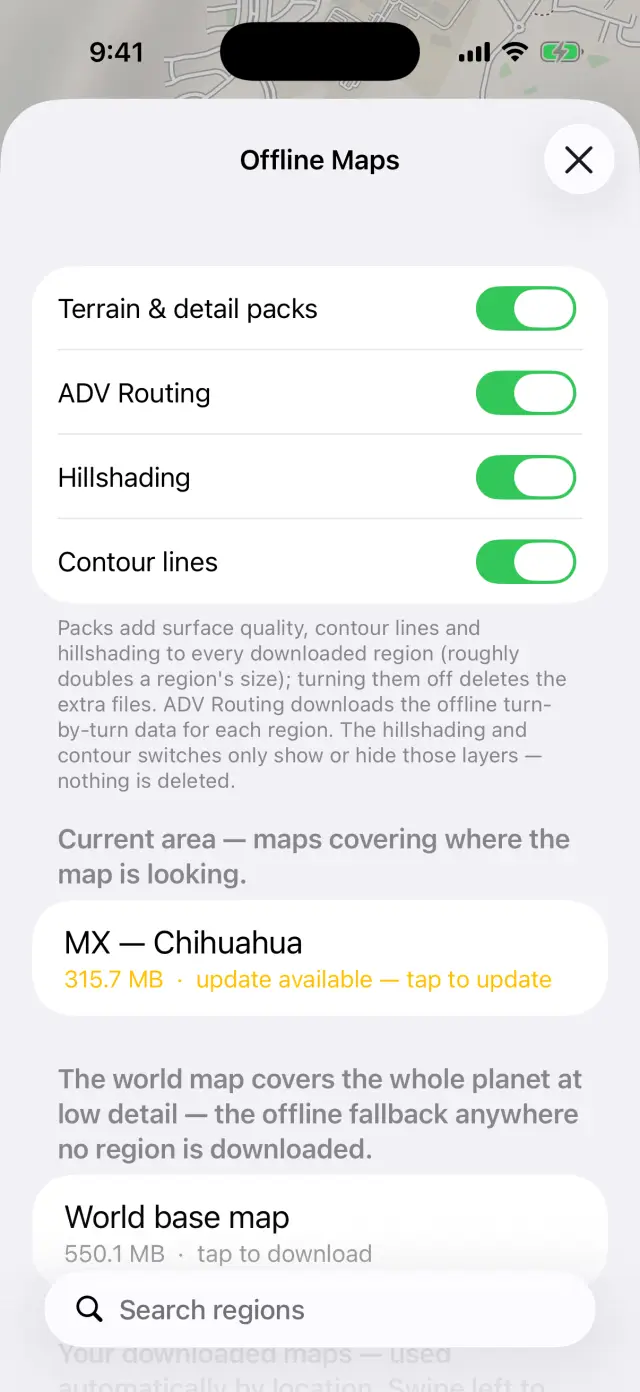
- Open Offline Maps (the download button on the map). Current area suggests maps covering where the map is looking; or browse by country and search regions.
- Tap a region to download full offline street detail. Browsing somewhere new, the app offers it by itself: "Download <region>?"
- Downloaded regions are used automatically by location — no switching. Swipe left on one to delete it.
600 regions across 87 countries, and the catalog keeps growing. On cellular, big downloads ask first.
Region downloads are tied to your free ADVx account — sign in once and the apps handle the rest. The free plan covers 3 new regions a calendar month: only the first download of a region counts, so updates and re-downloads of maps you already hold are always free, and the counter resets on the 1st. The world base map and the auto-downloaded preview never count. ADVx Pro removes the limit. Offline Maps shows where you stand at the bottom of the region list.
Terrain & detail packs
ADVx Pro — what's included
Each region can carry extra layers, toggled at the top of Offline Maps and downloaded per region:
- Hillshading — relief you can read at a glance.
- Contour lines — elevation lines like a topo map, in meters or in round feet to match your Units setting (the row at the bottom of this same screen — see The Navigator).
- The ADV overlay — highlights the unpaved network with surface detail on the dirt roads and tracks you're actually here for. It deliberately leaves foot paths and bridleways plain, so the overlay never dresses up a line you can't ride.
- ADV Routing — the routing pack that lets the phone compute turn-by-turn routes offline (see ADV Routing).
Update all refreshes everything you've downloaded when new map builds land.
Good to know
- Switched your Units after downloading a region? The contours for the other system aren't fetched automatically — toggle Terrain & detail packs off and back on for that region (or re-download it) to pull them in.
- Big downloads survive interruptions — lose signal, close the app, or reboot mid-download and it picks up where it left off instead of starting over.
- The footer shows exactly how much space offline maps use on the device.
- Deleting a region while offline warns you first — you can't re-download it until you're back on a network. Delete Anyway / Keep.
- Everything here is shared by the whole app: navigation, search, routing, and CarPlay / Android Auto all read the same downloaded maps.